File Permissions and Access Control Lists
Accenture
Today is more on Reading, Learning and Implementing File permissions
What is File Permission In Linux?
- File permissions determine who can access files and directories on a system and how.
Permission Groups
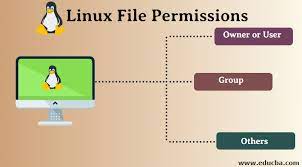
There are three permissions groups:
Owner
Group
Other
This article provides an overview of Linux file permissions, how they work, and how to change them.
Create a simple file and do ls -ltr to see the details of the files.

File Permissions
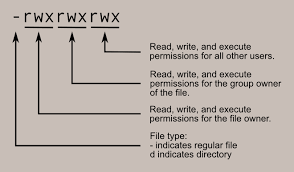
All three owners (user owner, group, others) in the Linux system have three types of permissions defined. Nine characters denote the three types of permissions.
Read (r): The read permission allows you to open and read the content of a file. But you can't do any editing or modification in the file.
Write (w): The write permission allows you to edit, remove or rename a file. For instance, if a file is present in a directory, and write permission is set on the file but not on the directory, then you can edit the content of the file but can't remove, or rename it.
Execute (x): In Unix type system, you can't run or execute a program unless execute permission is set. But in Windows, there is no such permission available.
File Permission Using Chmod
chmod is a command in Unix and Unix-like operating systems that is used to change the file permission of a file or directory.
The file permission determines who can read, write, and execute the file. There are three types of permissions: read (r), write (w), and execute (x), and there are three categories of users who can have these permissions: owner (u), group (g), and others (o).
The syntax for the chmod command is:
chmod u+x,g+x,o+wx <file_name>
mode is the new permission to be set, and file is the name of the file or directory whose permission is to be changed.
Here are some common examples of using the chmod command:
Give the owner of the file read, write, and execute permissions, and remove all permissions for group and others:

Give the owner and group read and write permissions, but allow only read permission for others:

What is ACL?
Access control list (ACL) provides an additional, more flexible permission mechanism for file systems. It is designed to assist with UNIX file permissions. ACL allows you to give permissions for any user or group to any disc resource.
Use of ACL :
Think of a scenario in which a particular user is not a member of the group created by you but still, but you want to give some read or write access, how can you do it without making the user a member of the group, here comes in picture Access Control Lists, ACL helps us to do this trick.
ACLs are used to make a flexible permission mechanism in Linux.
From Linux man pages, ACLs are used to define more fine-grained discretionary access rights for files and directories.
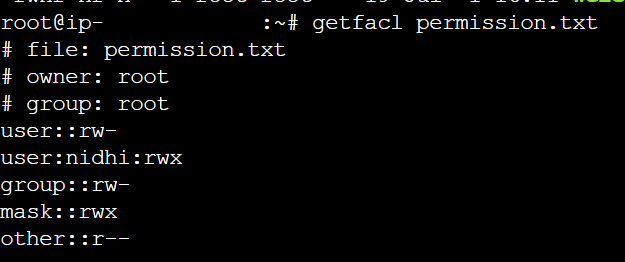
setfacl and getfacl are used for setting up ACL and showing ACL respectively.
setfacl -m u:nidhi:rwx permission.txt
In this example, the -m option is used to modify the ACL, u:nidhi specifies the user nidhi, and rwx grants nidhi read, writes and executes permissions on permission.txt.
getfacl is used to show the ACL: