Day 10 Task: Advanced Git & GitHub for DevOps Engineers

Accenture
Git Branching
Branching means you diverge from the main line of development and continue to do work without messing with that main line.
The master branch is the stable branch. Must be always in a releasable state.
Feature branches are created from the master.
Features may be experimental. If not pursued, branches are discarded without corrupting the stability of the master branch.
When a feature is complete, the corresponding feature branch is merged into the master branch.
When the master has enough stable features, it is released.
If an issue (typically a bug requiring immediate attention) in the master is detected, a hotfix/issue branch is created from master.
Once the hotfix is complete it is merged to master and any open feature branch (if needed).

we can perform various operations on Git branches. The git branch command allows you to create, list, rename and delete branches. Many operations on branches are applied by the git checkout and git merge commands. So, the git branch is tightly integrated with the git checkout and git merge commands.
Create Branch
git branch <*branch name*\>

List Branch
git branch - list or git branch

Delete Branch
git branch -d<branch name**\>

Switch Branch
git checkout<branch name**\>


Rename Branch
git branch -m <*old branch name\><new branch name*\>

Merge Branch

Git Revert & Git Reset
The git revert command is used to apply the revert operation. It is an undo-type command. It does not delete any data in this process; instead, it will create a new change with the opposite effect and thereby undo the specified commit.
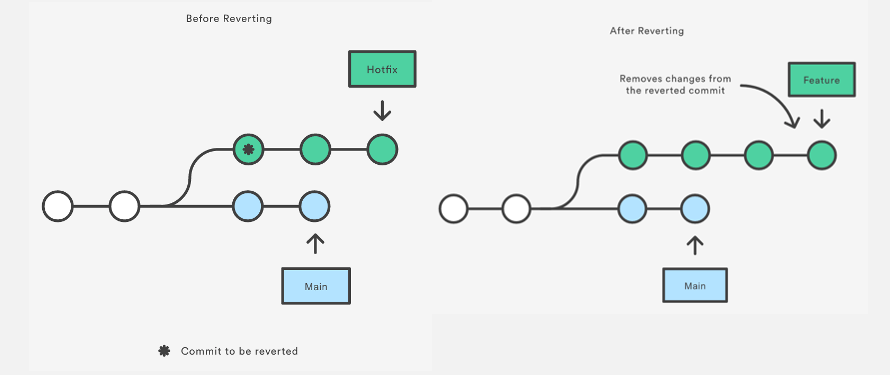
Git reset, on the other hand, moves the HEAD pointer and resets the staging area to a specific commit. This is useful when you want to completely remove changes made after a certain point in time.

TASK 1
Add a text file called version01.txt inside the Devops/Git/ with “This is the first feature of our application” written inside. This should be in a branch coming from the master.
step:1- Clone the Repository to your local system:
#git clone <url>
Step:2- Make sure you are in Main Branch, Create a branch name Dev
#git branch Dev
#git checkout Dev
Step:3- Create a file name version01.txt & add content to it “This is the first feature of our application”.

Step:4- Now add it and commit it with the message "Added new feature"
git commit -m "Added new feature"

Add a new commit in the dev branch after adding the below-mentioned content in Devops/Git/version01.txt.
1st line>> This is the bug fix in the development branch

- Commit this with the message “ Added feature2 in development branch”

Do changes to version01.txt again and commit it.


