Advanced Linux Shell Scripting for DevOps Engineers with User management
Accenture
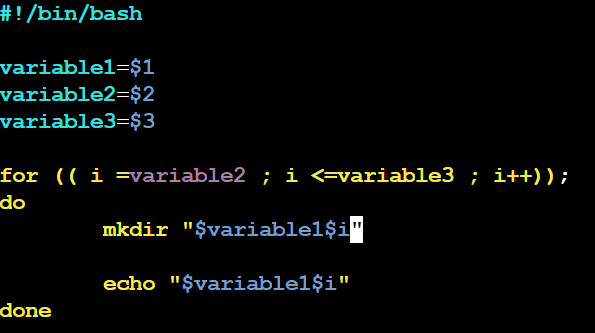
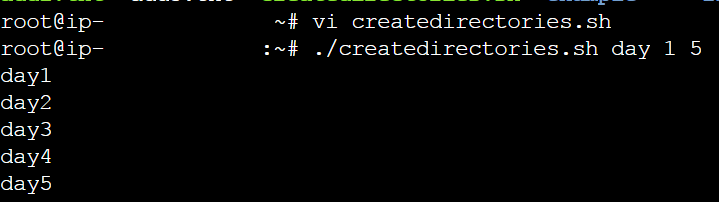
Create 5 directories at a time using scripting. Instead of creating it manually one by one make a use of for loop which will create it in one go within a second.
So we are passing three arguments here. variable1 is the name of the directory, variable2 is the number from where the directory will start and variable3 is the number where the directory will end.
Script:
op:
Read about cron and crontab
Cron is the system's main scheduler for running jobs or tasks unattended. a command called crontab allows the user to submit, edit or delete entries to cron. A crontab file is a user file that holds the scheduling information.
The Cron daemon is a background process/service that runs continuously on the system and checks the crontabs of all users to see if any commands need to be executed at a particular time. Cron uses a configuration file called "crontab" to manage the schedule of commands.
Create a backup script:
For example, let's create a script called "backup. sh" that backs up a specific directory:
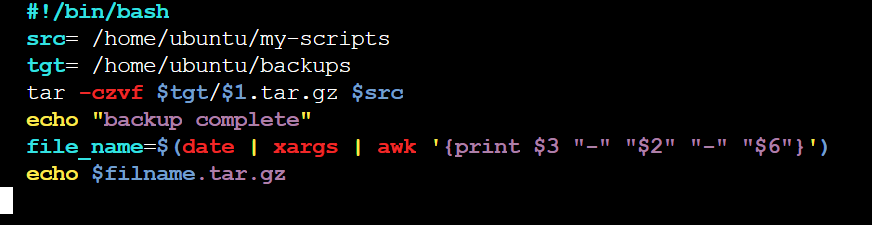
Schedule the script using cron. Follow below mentioned steps for it:
Open the crontab editor by running the command "crontab -e" in your terminal.
If prompted to select an editor, choose your preferred text editor.
Add a new line to the crontab file with the following syntax:

In the crontab file:
m- minutes
h- hour
dom- day of the month
mon- month
dow- day of the week
where * means every. For example every minute, every hour
In the above example, 0 implies at the start of the hour
2 in hour means "2:00 AM"
The command that follows the cron expression is /home/ubuntu/backup.sh /home/ubuntu /home/ubuntu/backup_directory. This means that the script located at /home/ubuntu/backup.sh will be executed, with /home/ubuntu as the source directory to be backed up and /home/ubuntu/backup_directory as the destination directory where the backup will be stored.
So the overall meaning of this cron job is to run the backup. sh script at 2:00 AM every day, using the specified source and destination directories.
crontab -e Use the crontab -e command to open your user account's crontab file
For checking use: crontab -l
Create user
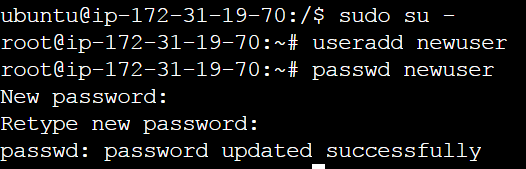
To add the user to the Linux system use: useradd user_name
To set the password use: passwd user_name